


Troubleshooting SitecoreAI Page Builder Stuck Forever on the Loading Spinner
Here's the awkward part of this failure: SitecoreAI Page Builder opens the page in its editor iframe and the website content is right there. You can see it, but you never get the editing UI. The ng-spd-loading-indicator stays on top indefinitely and blocks interaction with the page.
Nothing points immediately to a dead rendering host. The page isn't blank, the app hasn't crashed completely, and there's no obvious "rendering host is unavailable" message. You may get only one browser console error, and it may look unrelated - duplicate initialization of a third-party script, for example.
For me, Page Builder got as far as displaying the page. The Sitecore loading overlay then stayed there. Getting the fix into DEV, UAT and PROD involved slightly different deployments, but it was the same fix, applied and verified in each environment.
Here is how I got from those first suspicions to the fix.
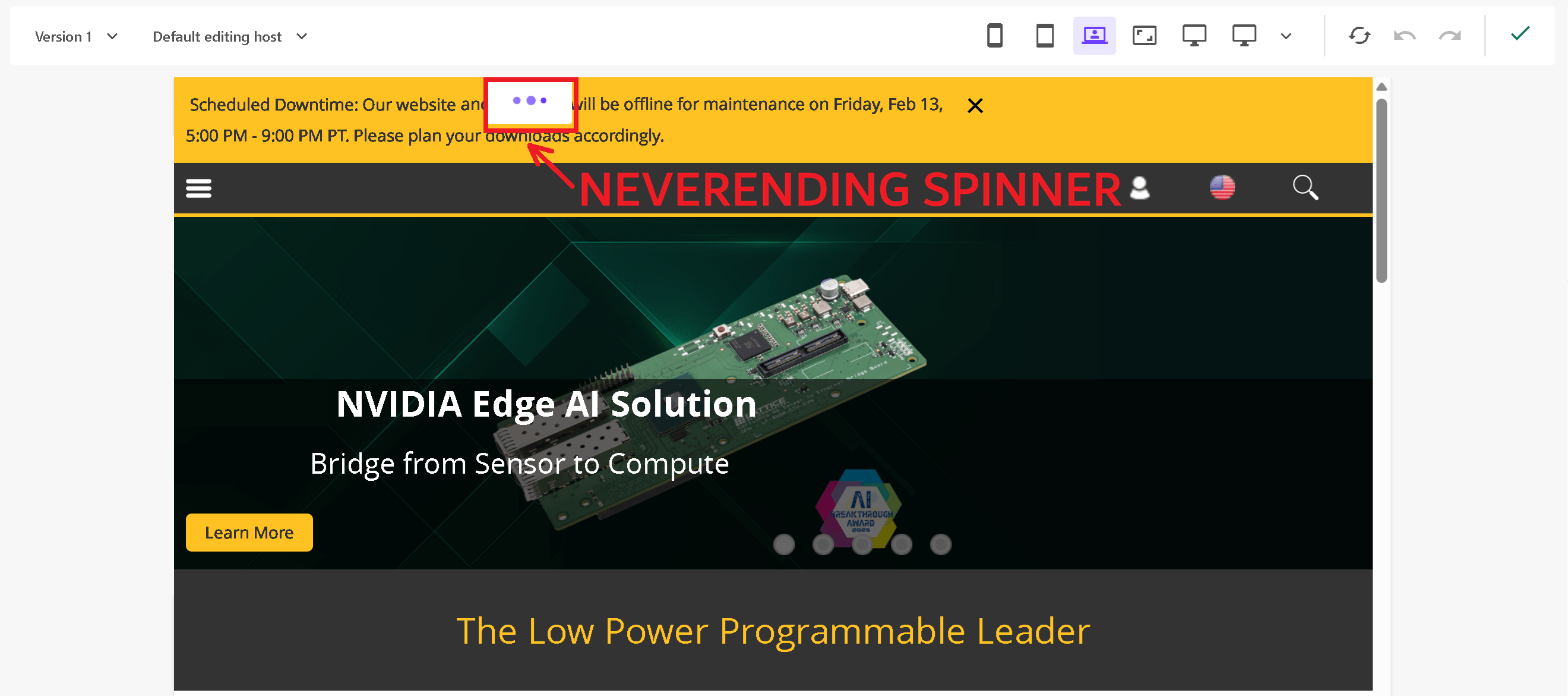
Something to start with.
First, a reminder of what Page Builder does when rendering in XM Cloud / SitecoreAI.
These are the main references:
- Environment, editing hosts and rendering hosts
- Configure an external editing host
- Editor integration using metadata
The public website isn't all that Page Builder needs. It sends a request to a rendering endpoint, usually:
https://<editing-host-or-rendering-host>/api/editing/render
The endpoint checks the editing secret and takes the Sitecore editing parameters from the request. It fetches editing layout data, renders the page with metadata and returns markup for Page Builder.
That's why rendering with metadata matters: a visible website isn't necessarily editable in Page Builder.
What I First Suspected
There are several reasonable places to start with a Page Builder spinner. Some of them do explain other cases.
1. Broken Rendering Host Configuration
The rendering host item was the first thing I suspected:
/sitecore/system/Settings/Services/Rendering Hosts
When using metadata-based editing, pay attention to these fields:
Server side rendering engine endpoint URL:
https://<host>/api/editing/render

Server side rendering engine application URL:
https://<host>/

Server side rendering engine configuration URL:
https://<host>/api/editing/config
I couldn't put the main failure down to these values, although wrong values here can stop Page Builder early. They are still worth checking.
2. Missing Environment Variables
After that I looked at the environment configuration. The following variables are needed for Preview context and editing on the editing host and external rendering hosts:
SITECORE_EDGE_CONTEXT_ID
NEXT_PUBLIC_SITECORE_EDGE_CONTEXT_ID
NEXT_PUBLIC_DEFAULT_SITE_NAME
SITECORE_EDITING_SECRET
I did have differences between environments, and corrected the variables, but the spinner still didn't go away. A missing value can give you 401, 404 or 500 from the render endpoint, depending on where it causes the application to fail.
3. Content, Presentation Details, or Personalization
Since I could see content in the iframe, a content-level problem seemed possible too:
- final/shared presentation that is broken
- a component that throws only in edit mode
- a datasource item that is missing in Preview
- a personalization rule that breaks the layout service output
- a page using a rendering without metadata support
I wouldn't rule these out as causes of a Page Builder failure. But I had the same application-level behavior across multiple pages and environments; it seemed less likely that one content item was behind it.
4. Experience Edge, Publishing, Indexing, or Links Database
I also considered whether the backend state could explain it:
- an item that hasn't been published to Edge
- an Edge cache that is stale
- an index that hasn't been rebuilt
- a links database that hasn't been rebuilt
- page route resolution that is wrong
I'd investigate those for missing content on a public site. But for editing, Page Builder gets Preview context and editing layout data. A problem rendering the public page can look much like an editing render problem in the browser, without being the same problem.
5. Browser Console Errors
The console also reported duplicate initialization of a third-party SDK. Suspicious, yes, but it wasn't blocking editing. The console was useful in the investigation; that prominent warning just wasn't the cause.
The Actual Symptom to Focus On
I wasn't dealing with a simple "the page does not load" failure.
More precisely, this was the failure:
The page content renders, but Page Builder never receives the successful editing-render completion it expects, so the ng-spd-loading-indicator never goes away.
I needed to look at the flow described above.
With a fully broken page, I'd usually look for a rendering exception. When the page renders but Page Builder can't edit it, I'd inspect the editing render flow.
The critical request is:
/api/editing/render
Editable markup with metadata is what Page Builder expects from that request.
How the Render Flow Is Supposed to Work
For Content SDK and Next.js, a Page Builder call to the render API route has parameters along these lines:
/api/editing/render
  ?secret=<editing-secret>
  &sc_site=<site-name>
  &sc_itemid=<item-id>
  &sc_lang=en
  &route=/
  &mode=edit
  &sc_version=latest
  &sc_layoutKind=shared
The SDK render middleware then:
- Checks that the editing secret is valid.
- Takes the editing parameters from the request.
- Turns on preview/editing mode.
- Calls the application back to render the requested page.
- Sends back HTML containing the metadata needed by Page Builder.
Following the callback back into the application showed me the problem.
This was an App Router application with a multisite route:
/{site}/{locale}/[[...path]]
Public traffic could use that route without trouble. The default render handler still did not know enough about where to render for Page Builder. Its internal editing render request was therefore subject to the usual routing and middleware, instead of being sent to a dedicated editing route.
Which left me in this rather odd situation:
- the page was visibly rendered
- the editing request was still affected by middleware and routing
- the response reaching Page Builder wasn't exactly what it needed
- the spinner stayed in place
The Fix: Create a Dedicated Editing Render Page
I needed the SDK render handler to send Page Builder editing requests somewhere private. I changed it to use a dedicated route and avoid coming back through the normal public one.
The render API route was creating its handlers with no options:
import { createEditingRenderRouteHandlers } from '@sitecore-content-sdk/nextjs/route-handler';

export const { GET, POST, OPTIONS } = createEditingRenderRouteHandlers({});
I added the options shown here:
import { createEditingRenderRouteHandlers } from '@sitecore-content-sdk/nextjs/route-handler';

export const { GET, POST, OPTIONS } = createEditingRenderRouteHandlers({
  allowedQueryParams: ['secret'],
  resolvePageUrl: () => '/sitecore-editing',
});
These options give the SDK the following instructions:
- preserve the
secretquery parameter - render editing requests through
/sitecore-editing - do not guess the public page URL for the internal request
For that private route I added this App Router page:
src/app/sitecore-editing/page.tsx
By the time this page renders the Sitecore page in editing mode, the SDK has already transformed the original sc_* query parameters into the editing request. Public traffic doesn't belong on this route.
The page has three jobs.
First comes request validation:
const CONTENT_SDK_PREVIEW_HEADER = "__content_sdk_preview";

if (
  !editingPreviewData ||
  requestHeaders.get(CONTENT_SDK_PREVIEW_HEADER) !== "1" ||
  secret !== scConfig.editingSecret
) {
  notFound();
}
Then it builds the editing preview data:
return {
  site,
  itemId,
  language,
  mode: mode === "edit"
    ? LayoutServicePageState.Edit
    : LayoutServicePageState.Preview,
  variantIds: getSearchParam(searchParams, "variantIds") || DEFAULT_VARIANT,
  version: getSearchParam(searchParams, "version"),
  layoutKind: getSearchParam(searchParams, "layoutKind") as LayoutKind | undefined,
};
It must then fetch Sitecore preview data, not public page data:
const page = await client.getPreview(editingPreviewData);
I could reuse the layout and providers from the normal public page. The data for this route comes from editing preview data, however, and the route stays out of the public routing behavior.
Do Not Forget Middleware
The middleware also needed a bypass.
If middleware handles multisite routing, localization, redirects, personalization, authentication, language cookies or similar behavior, it may also intercept /sitecore-editing.
That is expected for public traffic, but can interfere with an internal editing render request.
I added a bypass for this route in the proxy/middleware:
export async function proxy(req: NextRequest, _ev: NextFetchEvent) {
  const langCookie = req.cookies.get(LANG_COOKIE_NAME)?.value;
  const pathname = req.nextUrl.pathname;

  if (pathname === '/sitecore-editing') {
    return NextResponse.next();
  }

  // normal middleware logic follows
}
The editing render pipeline needed this bypass in order to use the route.
How I Verified the Fix
You don't need to open Page Builder yet to make the following checks.
1. Check the Render API Route
The render endpoint should respond to OPTIONS:
curl.exe -sS -o NUL -D - -X OPTIONS https://<host>/api/editing/render
A good response is:
HTTP/1.1 204 No Content
X-Matched-Path: /api/editing/render
That response tells you the route is there on the deployed host.
2. Check the Private Editing Route
Direct browser access to /sitecore-editing should be blocked by the page's protection:
curl.exe -sS -o NUL -D - https://<host>/sitecore-editing
Expected result:
HTTP/1.1 404 Not Found
X-Matched-Path: /sitecore-editing
The request has matched the route, so the route exists. But a direct request has neither the internal preview header nor the secret. The security checks should therefore refuse access, which is what this response shows.
3. Check the Actual Page Builder Network Flow
Now open Page Builder with the Network tab in view.
The request to /api/editing/render should complete. A normal error needs its own troubleshooting. When the HTML looks like a public route, there are two checks: resolvePageUrl must point to /sitecore-editing and middleware must not rewrite it.
Deployment Gotchas Across DEV, UAT, and PROD
The environments had different deployment setups.
In DEV the shared render helper was already in the application branch. I could therefore put the fix straight through the development branch.
For UAT I needed to update both the Sitecore editing host and the external Vercel rendering host. Either can be used by Page Builder; the rendering host item configuration determines which.
In PROD the production editing host was tied to main, rather than the development branch. I couldn't push the whole development branch to it. Instead I backported just the fix to main, including only:
src/app/api/editing/render/route.ts
src/app/sitecore-editing/page.tsx
src/proxy.ts
Then the production editing host was deployed from main, and the production Vercel projects were deployed manually because Git deployments were disabled for those projects.
That's why I would check both hosts' deployments when fixing Page Builder. The public rendering host may not be deployed in the same way as the Sitecore editing host.
The Minimal Checklist
For another occurrence, I'd work through these checks:
- Establish whether Page Builder is failing during editing render, rather than just public page rendering.
- Check
/api/editing/renderon the rendering host configured in Sitecore. - Use the metadata endpoint in the rendering host item, not an old
/jss-renderendpoint. - Check the host has
SITECORE_EDITING_SECRETand the Edge preview variables. - Check whether App Router, middleware, redirects, localization or multisite proxy logic intercept editing requests.
- Give App Router editing render its own
/sitecore-editingroute. - Have
createEditingRenderRouteHandlersuse that route viaresolvePageUrl. - Make middleware bypass
/sitecore-editing. - Get the change deployed to the Sitecore editing host and all external rendering hosts that Page Builder might use.
- Check
OPTIONS /api/editing/render, and check the protection against direct access on/sitecore-editing.
Final Thoughts
I had a rendered site and visible content, which hardly looked like a crash. I also had console errors that could lead me away from the actual problem. None of that changed the fact that Page Builder couldn't proceed.
The response from the rendering host has to be editing-aware and metadata-enabled for SitecoreAI Page Builder. When using Next.js App Router with custom middleware, I'd take the safest option: give the SDK render handler a dedicated private route and keep it outside the normal public routing pipeline.
After that change the spinner went away. Editing worked normally across the environments again.
So even if it looks like a broken component or an item you can't edit, check what happens between Page Builder and the rendering host as well.