10 Useful tricks for Helix development
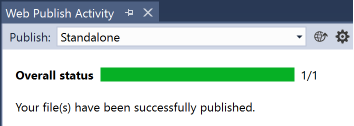
1. First, is the most important hotkey that published a single file - whether a static file oк Razor view, to the web folder, preventing you from running gulp script. Selecting the desired file, hold ALT and then click ; (semicolon) and p. Your file will be immediately available at web destination. Then most time-taking is Application pool recycle process, running each time you add/remove/modify a config file or DLL, so current approach prevents you from wasting time on that. The result:

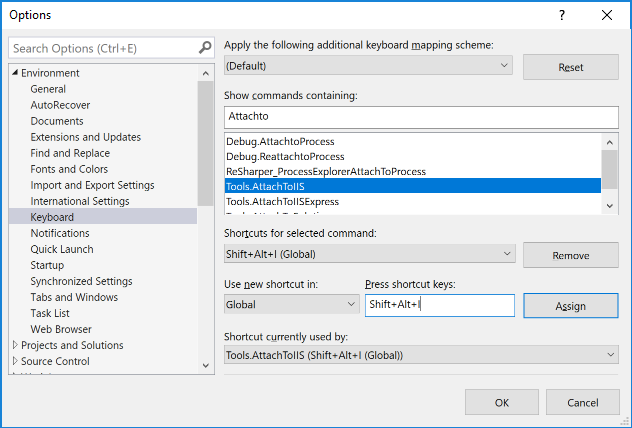
2. Next, in order to run Sitecore in a debugger, one usually need to go to "Debug" menu of Visual Studio, then pick up "Attach to process". Then find w3wp.exe from a long list of available processes after selecting "Show processes from all users" checkbox. When you need to do that multiple times in a day (and you do) it becomes an unwanted waste of time. There is a Visual Studio extension called AttachToAllTheThings that adds 3 handy menu items into Tools menu, one of which is "Attach to IIS". So far so good, but it would be even better to assign a hotkey to make attachments quicker, I use a combination of SHIFT + ALT + I:

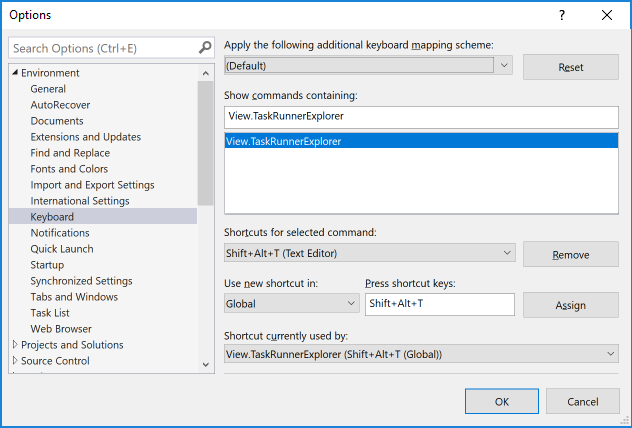
3. Working with Helix you often need to run gulp tasks, that is executed from Task Runner Explorer. Normally you need, to go to View menu item then Other windows and there find out Task Runner Explorer. In a clean vanilla Visual Studio you may use CTRL + ALT + BackSpace binding. However those using ReSharper may find that combination re-mapped, so I opt-out in favour of neutral SHIFT + ALT + T combination:

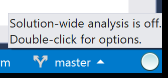
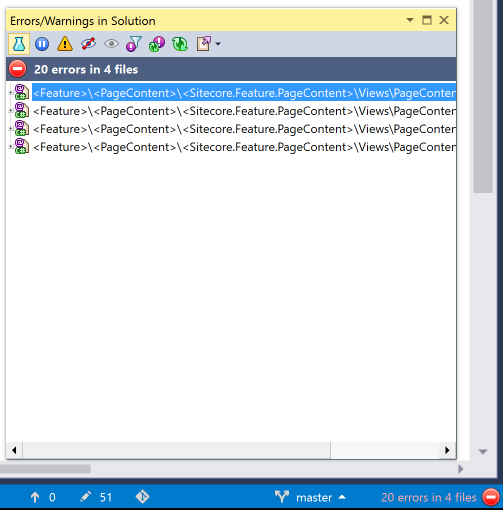
4. If you are using ReSharper, you can benefit from its solution-wide code analysis tool. This is a very handy tool that is often overlooked, but it may give you plenty of insights of what's going wrong with your solution and how to fix that. But please be careful as if it is enabled permanently - if affects your performance. Double click a grey circle at the right bottom corner of Visual Studio in order to enable this feature.

After a while, it presents you with a list of issues you need to review (and likely to fix):

5. Also, one more useful trick of ReSharper will be useful for everyone working with abstractions. We got used to navigating to a class by doing CTRL + Left Mouse Click. But when doing the same on an interface, you'll navigate to the interface definition - not something useful when you expected to get some concrete implementation. Do CTRL + ALT + Left Mouse Click instead and you'll navigate to exact implementation if the is one, or will be presented with a list of all concrete classes implementing that abstraction.
6. Helix: An approach(es) for restoring WebRoot to an initial state of vanilla Sitecore installation.
7. Know your tools: The easiest way to add a new project to your Helix solution
8. Use Helix + Glass Mapper + T4 Templates = Code Generation
9. In addition to T4 Templates code generation, you may use young brother - Visual Studio code snippets. Recently Raul Jimenez prompted at https://github.com/rauljmz/Sitecore.VisualStudio.Snippets.
10. ZeroDeploy from Hedgehog, who also made TDS, Razl and Feydra. This is something unbelievable, you can't imagine that! The idea of the project is to get rid of Application Pool recycles upon deployments of code and config files. How could that be at all possible? ZeroDeploy relied on Sitecore Dependency Injection (that's why it only can run on Sitecore 8.2 or later) and instead of /bin folder it stores versioned libraries into Sitecore database, being even visible at the Sitecore tree! To make this magic possible, it is advised to separate most of your high-level abstractions into standalone libraries, that are very rarely change and that referenced from your web project. At the same time most of the concrete implementation, including Controllers, Services, Repositories and libraries down-referenced by them can be dynamically deployed and loaded back without being put to /bin, retaining the functionality. ZeroDeploy also uses Visual Studio extension and NuGet packages for Sitecore. Seriously, the magic! I am now testing a beta version of ZeroDeploy and am going to write a detailed guide on how to enable this on your development environment (your UAT / staging / prod) still remain untouched.
Hope these tips and tricks will improve your productivity!
Helix working on Sitecore 9
I have managed to make Sitecore 9 and Helix working together. Yaaay!
There is a feature/v9 branch of Sitecore Habitat, where habitat guys unhurriedly adjust Habitat to Sitecore 9. I would advise you to take a look at that at least. One thing to mention (as for 01-Dec-2017) - you'd need to reference all the Sitecore 9 dependencies from NuGet manually, please use *.NoReferences version of each library)
Update: I've recorded entire process of installation Helix with Sitecore 9 on a clean developer machine, that already has Visual Studio 2017, SQL Server 2016 and IIS installed. For installation process also required: PowerShell and Chocolatey. Important: all the manipulations are done as Administrator.
Hope one may find useful this 24 minutes video. Thanks for watching!
Introducing Sitecore Telegram
Telegram Messenger has boosted significantly during past years, as the most convenient and functional with UX well thought and incredibly growing base of users. Since recent, Telegram allows creating informational channels, making itself more than a messenger, but a proper publishing platform.
Apart from that, the messenger is perfect for distributing binaries of any format, it also supports any mobile or desktop platform. With such a simplicity of creating the content and delivering it to all subscribers, Telegram became my communicational app number one.
Today I decided to create a Sitecore channel in Telegram, that would be a merely a news channel for the events happening in a Sitecore world. It will also provide the hottest articles created by the community in recent, with a plans to integrate this channel with Sitecore Link project by implementing a search bot, that will return you with most relevant links according to search criteria provided.
So, if you are already using Telegram messenger, just click this link and subscribe! If not - only two more clicks limits you from using the most functional and secure messenger in the world that keeps you be aware of your favourite digital platform - Sitecore.
Stay tuned!
Sitecore Cheat Sheets
While working with Sitecore, you have to keep in mind plenty of things, few of them not easy to remember. To simplify my life as a developer, I have created a compilation of various cheat sheets for various aspects of work with Sitecore. Having that printed on standard A4 papers I found that not quite convenient, and decided to re-create in more convenient format. Then I thought why not to issue that in a portable book format, and share with hundreds of people it may help.

Table of Content:
- Sitecore Item API
- ULR parameters
- Sitecore queries
- Sitecore PowerShell
- Content Search API
- Admin folder pages
- Security
- Databases
- Mongo
- Configuration
- Core database
- Rules engine
- Helix / Habitat
- Razor view extensions
- Glass Mapper
- Azure
- Going live
- ReSharper most used hotkeys
- IIS and AS.NET
- Icons in Sitecore
Symposium 2017 and takeaways
I've been anticipating that event for so long, and finally, I was there! So let's take a look at what's new have been presented.
Sitecore 9 and xConnect brought a new era of Sitecore development. Starting from principally different installation approach, Sitecore brings multiple changes, the most significant of which are changes developers used to work with xDB (which now moved to SQL Server) and content search (which is now Solr by default). Now instead of calling xDB directly, we will be using xConnect API, which is very well documented, thanks to Martina Welander and her team.
CRM connectors have been announced - for both Dynamics and Salesforce.
Zenith and Horizon - two Sitecore projects currently in development, but both are very promising. It will change the way we work with the platform, but as for now, there is no way too much information about.
Marketing Automation has been re-worked to the best. Brimit, a Sitecore partner, has arranged a perfect demonstration stand of xConnect and marketing Automation working together on Sitecore 9, identifying contact's (visitor's) parameters from both online and offline channels and assigning them to certain profile pattern card, with sending them personalised email afterwards.
Sitecore Cortex will be a new machine-learning technology to be used along with Sitecore xDB in order to increase personalisation and data analysis.
I spent decent time talking to guys from the team that builds the core of the platform and Express Upgrade Tool. The last one became a mature intelligent tool allowing do controlled upgrades from almost any recent version of Sitecore to version 9, with identifying all the potential issues and configuration breaking changes. I proud that have suggested few valuable ideas for the product about identifying any customises pipeline changes for the instance.
Technical Preview of JavaScript Services.
Thursday morning Symposium finished, but not for the 250+ lucky to be announced Sitecore MVPs of 2017. We have had 2 more thrilling days of MVP Summit.
Almost everything we have been told or presented there has a "non-disclosure" label, so there's not too much to share. Summit was held at much faster pace, comparing to Symposium itself - longer up to 1 hour long deep presentations, with short 5-10 minutes breaks. We were given a great opportunity to challenge new Sitecore 9 training exam, so that whoever passes that test - becomes Sitecore 9 certified already (as I did!). We also took part in Round Table, where various Sitecore teams were presented at round tables, so MVPs were travelling from one interested table to another, raising questions, suggesting ideas and providing feedback.
Sitecore 9 is out there

So, finally, what we all have been waiting for, has happened - Sitecore 9 has been announced and released. To be honest, as an MVP, I already have had an access to a beta of the version 9 of Sitecore since late July. but after an official release, we now can publically talk about that.
So, what has been new:
Runtime for Sitecore 9 is .NET Framework 4.6.2 and most of Sitecore 9 NuGet libraries are built against that version of the framework.
The installation process is the first you meet when trying to play with the platform. And it's worth saying that installation process has been totally reworked. So, welcome Sitecore Install Framework - Powershell modules for install and uninstall and a set of JSON config files that store steps for installing Sitecore. Each of these JSON files relies on a part of installation: xConnect, Solr and Sitecore itself. No SIM support (yet) available, unfortunately.
I mentioned xConnect - that is a new component and probably the largest architectural change for the platform - a framework that allows you to read and write analytics data to xDB and search providers, keeping collections, processing, search (Solr) and reporting behind itself. Previously we have had 4 different APIs used to deal with xDB contact, depending on its state, so that entire method full of if /else clauses looked monstrous. Since now we do not do direct xDB calls and operate using XConnectClient. That allows updating contacts from any channel at any time and automatic indexing of data. Sitecore XP introduces client certificate authentication in order to communicate with xConnect server, that is a Windows service. Also, a good thing is that this framework is well documented.
SQL Server 2016 becomes the only storage for all Sitecore databases - content data, xDB, marketing, processing, reporting etc. If you are desperate to keep Mongo - nothing to worry about it is still possible to do, or you may store in the cloud with Microsoft Azure SQL or Azure DocumentDB.
Solr is now search provider by default, and it is also required for installation by Sitecore Installation Framework. Sitecore 9.0 supports version 6.6.2 and sorry not for having version 7.+ of Solr. It is commonly used to install Solr as a windows service, using nssm as the easiest.
Few SQL tricks helping to work with Sitecore
1. Delete all the databases having a specific prefix, in the example below it will drop all the databases starting with habitat.dev.local_ - this may be helpful when Sitecore 9 installation broke half way down and you'd like to return everything to an initial point, also removing (partly) installed databases:
USE MASTER
GO
DECLARE @dbnames NVARCHAR(MAX)
DECLARE @statement NVARCHAR(MAX)
SET @dbnames = ''
SET @statement = ''
SELECT @dbnames = @dbnames + ',[' + name + ']' FROM sys.databases WHERE NAME LIKE 'habitat.dev.local_%'
IF LEN(@dbnames) = 0
BEGIN
PRINT 'no databases to drop'
END
ELSE
BEGIN
SET @statement = 'drop database ' + SUBSTRING(@dbnames, 2, LEN(@dbnames))
PRINT @statement
EXEC sp_executesql @statement
END
2. Backup all SQL database having some prefix (in this case, habitat.dev.local_) to a folder (like C:\DatabaseBackups\):
DECLARE @name VARCHAR(50) -- database name DECLARE @path VARCHAR(256) -- path for backup files DECLARE @fileName VARCHAR(256) -- filename for backup DECLARE @fileDate VARCHAR(20) -- used for file name DECLARE @scPrefix VARCHAR (20) -- Sitecore database prefix -- specify database backup directory SET @path = 'C:\DatabaseBackups\' -- specify filename format SELECT @fileDate = CONVERT(VARCHAR(20),GETDATE(),112) -- specify the Sitecore db prefix SET @scPrefix = 'habitat.dev.local_'
DECLARE db_cursor CURSOR FOR SELECT name FROM master.dbo.sysdatabases WHERE CharIndex(@scPrefix, name) = 1 OPEN db_cursor FETCH NEXT FROM db_cursor INTO @name WHILE @@FETCH_STATUS = 0 BEGIN SET @fileName = @path + @name + '_' + @fileDate + '.BAK' BACKUP DATABASE @name TO DISK = @fileName FETCH NEXT FROM db_cursor INTO @name END CLOSE db_cursor DEALLOCATE db_cursor
3. Shrink all databases larger than a certain number of megabytes (stored in @megabytesMoreToShrink variable):
DECLARE @megabytesMoreToShrink INT SET @megabytesMoreToShrink = 100
DECLARE @name NVARCHAR(MAX)
DECLARE @logical_name NVARCHAR(MAX)
DECLARE db_cursor CURSOR FOR
SELECT db.name AS DBName, mf.Name AS Logical_Name
FROM sys.master_files mf INNER JOIN sys.databases db ON db.database_id = mf.database_id Where type_desc = 'LOG' AND (size*8)/1024 > @megabytesMoreToShrink
OPEN db_cursor
FETCH NEXT FROM db_cursor INTO @name, @logical_name
WHILE @@FETCH_STATUS = 0
BEGIN
exec('USE ' + @name + ' ;ALTER DATABASE ' + @name + ' SET RECOVERY SIMPLE;DBCC SHRINKFILE ('''+@logical_name +''', 1);ALTER DATABASE '+@name +' SET RECOVERY FULL')
FETCH NEXT FROM db_cursor INTO @name, @logical_name
END
CLOSE db_cursor
DEALLOCATE db_cursor4. Change sa password for SQL instance, you do not need to know the previous password at all, but need to have an administrative access, for sure. Run osql tool, it's path should be added to the environment variable, but if it's not there, please find it here: "%ProgramFiles%\Microsoft SQL Server\130\Tools\Binn\OSQL.exe":
osql -S SITECOREDEV -E 1> sp_password NULL, 'SA_PASSWORD','sa' 2> GO
5. Some basic item's operations, such as retrieving by ID, by parent and retrieving fields and versions:
-- Get item by Sitecore ID
SELECT TOP 1000 *
FROM [habitat_Master].[dbo].[Items]
WHERE ID = '{110D559F-DEA5-42EA-9C1C-8A5DF7E70EF9}'
-- Get item by ID of parent in Sitecore
SELECT TOP 1000 *
FROM [habitat_Master].[dbo].[Items]
WHERE ID = '{110D559F-DEA5-42EA-9C1C-8A5DF7E70EF9}'
-- Enumerate all the versioned fieds for an item in Sitecore by item ID
SELECT TOP 1000
i.Name, v.[Id], [ItemId], [LANGUAGE], [FieldId], [Value], v.[Created], v.[Updated]
FROM [habitat_Master].[dbo].[versionedFields] v
JOIN [habitat_Master].[dbo].Items i
ON v.FieldId = i.ID
WHERE ItemId = '{110D559F-DEA5-42EA-9C1C-8A5DF7E70EF9}'
ORDER BY [Name]5. Some basic item's operations, such as retrieving by ID, by parent and retrieving fields and versions:
-- Get item by Sitecore ID
SELECT TOP 1000 *
FROM [habitat_Master].[dbo].[Items]
WHERE ID = '{110D559F-DEA5-42EA-9C1C-8A5DF7E70EF9}'
-- Get item by ID of parent in Sitecore
SELECT TOP 1000 *
FROM [habitat_Master].[dbo].[Items]
WHERE ID = '{110D559F-DEA5-42EA-9C1C-8A5DF7E70EF9}'
-- Enumerate all the versioned fieds for an item in Sitecore by item ID
SELECT TOP 1000
i.Name, v.[Id], [ItemId], [LANGUAGE], [FieldId], [Value], v.[Created], v.[Updated]
FROM [habitat_Master].[dbo].[versionedFields] v
JOIN [habitat_Master].[dbo].Items i
ON v.FieldId = i.ID
WHERE ItemId = '{110D559F-DEA5-42EA-9C1C-8A5DF7E70EF9}'
ORDER BY [Name]6. One of the most popular snippets, to restore default admin / b password. Please keep in mind running that against core database:
-- use core database
UPDATE dbo.aspnet_Membership
SET
Password='qOvF8m8F2IcWMvfOBjJYHmfLABc=',
PasswordSalt='OM5gu45RQuJ76itRvkSPFw=='
WHERE
UserId = (SELECT UserId FROM dbo.aspnet_Users WHERE UserName = 'sitecore\Admin')7. Copy users and all their data including passwords from core database of one instance to another:
-- Copy all non-existing users and their data from OLD core database to NEW core database
INSERT INTO [Sitecore.NEW.Core].dbo.aspnet_Applications SELECT * FROM [Sitecore.OLD.Core].dbo.aspnet_Applications
WHERE NOT EXISTS (SELECT * FROM [Sitecore.NEW.Core].dbo.aspnet_Applications WHERE [Sitecore.NEW.Core].dbo.aspnet_Applications .ApplicationId = [Sitecore.OLD.Core].dbo.aspnet_Applications.ApplicationId)
INSERT INTO [Sitecore.NEW.Core].dbo.aspnet_Membership SELECT * FROM [Sitecore.OLD.Core].dbo.aspnet_Membership
WHERE NOT EXISTS (SELECT * FROM [Sitecore.NEW.Core].dbo.aspnet_Membership WHERE [Sitecore.NEW.Core].dbo.aspnet_Membership .UserId = [Sitecore.OLD.Core].dbo.aspnet_Membership.UserId)
INSERT INTO [Sitecore.NEW.Core].dbo.aspnet_Paths SELECT * FROM [Sitecore.OLD.Core].dbo.aspnet_Paths
WHERE NOT EXISTS (SELECT * FROM [Sitecore.NEW.Core].dbo.aspnet_Paths WHERE [Sitecore.NEW.Core].dbo.aspnet_Paths .PathId = [Sitecore.OLD.Core].dbo.aspnet_Paths.PathId)
INSERT INTO [Sitecore.NEW.Core].dbo.aspnet_PersonalizationAllUsers SELECT * FROM [Sitecore.OLD.Core].dbo.aspnet_PersonalizationAllUsers
WHERE NOT EXISTS (SELECT * FROM [Sitecore.NEW.Core].dbo.aspnet_PersonalizationAllUsers WHERE [Sitecore.NEW.Core].dbo.aspnet_PersonalizationAllUsers.PathId = [Sitecore.OLD.Core].dbo.aspnet_PersonalizationAllUsers .PathId)
INSERT INTO [Sitecore.NEW.Core].dbo.aspnet_PersonalizationPerUser SELECT * FROM [Sitecore.OLD.Core].dbo.aspnet_PersonalizationPerUser
WHERE NOT EXISTS (SELECT * FROM [Sitecore.NEW.Core].dbo.aspnet_PersonalizationPerUser WHERE [Sitecore.NEW.Core].dbo.aspnet_PersonalizationPerUser.PathId = [Sitecore.OLD.Core].dbo.aspnet_PersonalizationPerUser .PathId)
INSERT INTO [Sitecore.NEW.Core].dbo.aspnet_Profile SELECT * FROM [Sitecore.OLD.Core].dbo.aspnet_Profile
WHERE NOT EXISTS (SELECT * FROM [Sitecore.NEW.Core].dbo.aspnet_Profile WHERE [Sitecore.NEW.Core].dbo.aspnet_Profile.UserId = [Sitecore.OLD.Core].dbo.aspnet_Profile.UserId)
INSERT INTO [Sitecore.NEW.Core].dbo.aspnet_Roles SELECT * FROM [Sitecore.OLD.Core].dbo.aspnet_Roles
WHERE NOT EXISTS (SELECT * FROM [Sitecore.NEW.Core].dbo.aspnet_Roles WHERE [Sitecore.NEW.Core].dbo.aspnet_Roles.RoleName = [Sitecore.OLD.Core].dbo.aspnet_Roles.RoleName)
INSERT INTO [Sitecore.NEW.Core].dbo.aspnet_SchemaVersions SELECT * FROM [Sitecore.OLD.Core].dbo.aspnet_SchemaVersions
WHERE NOT EXISTS (SELECT * FROM [Sitecore.NEW.Core].dbo.aspnet_SchemaVersions WHERE [Sitecore.NEW.Core].dbo.aspnet_SchemaVersions.Feature = [Sitecore.OLD.Core].dbo.aspnet_SchemaVersions.Feature)
INSERT INTO [Sitecore.NEW.Core].dbo.aspnet_Users SELECT * FROM [Sitecore.OLD.Core].dbo.aspnet_Users
WHERE NOT EXISTS (SELECT * FROM [Sitecore.NEW.Core].dbo.aspnet_Users WHERE [Sitecore.NEW.Core].dbo.aspnet_Users.UserName = [Sitecore.OLD.Core].dbo.aspnet_Users.UserName)
INSERT INTO [Sitecore.NEW.Core].dbo.aspnet_UsersInRoles SELECT * FROM [Sitecore.OLD.Core].dbo.aspnet_UsersInRoles
WHERE NOT EXISTS (SELECT * FROM [Sitecore.NEW.Core].dbo.aspnet_UsersInRoles WHERE [Sitecore.NEW.Core].dbo.aspnet_UsersInRoles.UserId = [Sitecore.OLD.Core].dbo.aspnet_UsersInRoles.UserId)
INSERT INTO [Sitecore.NEW.Core].dbo.aspnet_WebEvent_Events SELECT * FROM [Sitecore.OLD.Core].dbo.aspnet_WebEvent_Events
WHERE NOT EXISTS (SELECT * FROM [Sitecore.NEW.Core].dbo.aspnet_WebEvent_Events WHERE [Sitecore.NEW.Core].dbo.aspnet_WebEvent_Events.EventId = [Sitecore.OLD.Core].dbo.aspnet_WebEvent_Events .EventId)8. Delete children item of an item with a given ID directly from SQL (beware item cache). Please make sure you execute that in a context of a Sitecore database (ie. call use Sitecore_master before running this):
DECLARE @parentId AS UNIQUEIDENTIFIER; SET @parentId = '{29267838-AAB2-415F-B07A-D006719CD088}'
DECLARE @RowsToProcess INT
DECLARE @CurrentRow INT
DECLARE @SelectCol1 UNIQUEIDENTIFIER
DECLARE @Items2Delete TABLE (RowID INT NOT NULL PRIMARY KEY IDENTITY(1,1),ID UNIQUEIDENTIFIER)
SET @parentId = '{29267838-AAB2-415F-B07A-D006719CD088}'
INSERT INTO @Items2Delete (ID)
SELECT [Descendant] AS ID
FROM [dbo].[Descendants]
WHERE Ancestor = @parentId
SET @RowsToProcess=@@ROWCOUNT
PRINT @RowsToProcess
INSERT INTO @Items2Delete (ID)
SELECT ID FROM [dbo].[Items] WHERE ParentID = @parentId
SET @RowsToProcess=@@ROWCOUNT
PRINT @RowsToProcess
SET @CurrentRow=0
WHILE @CurrentRow<@RowsToProcess
BEGIN
SET @CurrentRow=@CurrentRow+1
SELECT
@SelectCol1=ID
FROM @Items2Delete
WHERE RowID=@CurrentRow
DECLARE @id AS UNIQUEIDENTIFIER;
SET @id = @SelectCol1
PRINT @id
EXEC sp_executesql N'DELETE FROM [Items]
WHERE [ID] = @itemId
DELETE FROM [SharedFields]
WHERE [ItemId] = @itemId
DELETE FROM [UnversionedFields]
WHERE [ItemId] = @itemId
DELETE FROM [VersionedFields]
WHERE [ItemId] = @itemId',N'@itemId UNIQUEIDENTIFIER',@itemId=@id
EXEC sp_executesql N'DELETE FROM [Descendants] WHERE [Descendant] = @itemId',N'@itemId uniqueidentifier',@itemId=@id
EXEC sp_executesql N' DELETE FROM [Links] WHERE [SourceItemID] = @itemID AND [SourceDatabase] = @database',N'@itemID uniqueidentifier,@database nvarchar(6)',@itemID=@id,@database=N'master'
EXEC sp_executesql N'DELETE FROM [Tasks] WHERE [ItemID] = @itemID AND [Database] = @database',N'@itemID uniqueidentifier,@database nvarchar(6)',@itemID=@id,@database=N'master'
ENDHope that helps you!
Updating existing presentation details of base template's standard values after it has been set on derived templates
Problem: let's imagine the situation when you may have some complex template inheritance. You would like to set presentation details for each of these templates' standard values, somehow like below:
A - define layout, and header/footer common holders that will be shared for all sites (we've got a multisite setup for now)
B - define footer and header on a site level so that they remain the same within each of implemented sites
C - define base page template that will add the rest of presentation shared between the pages (but not homepage)
Once you set presentation for standard values of A, you can go to standard values of B and see these changes, so that you add only B-specific components; the same exact story will be when you will go next to std. values of C an so on. So far, so good.
The problem occurs when you want to modify presentation coming with a base template after a derived presentation is already set. In that case, you will not see any difference, that may be seen a weird for a while. In our example, imagine you've set presentation for std. values of all three templates - A, B and then C, and then decided to add one more component to a presentation on A template (or change datasource item of existing etc.). You do changes for std. values of A, save it and as you see - these changes come into a play for template A, however, once you open B or C they won't be there...
Explanation: let's think what in fact Standard Values are - just the default values for each of field defined in that (or parent) template. In the second case if a field has standard values for both parent and inherited template - it simply overrides parent value with inherited child's value. But, wait for a second - presentation is also stored in fields of Standard Template that all pages inherit from, how that makes possible, does it simply override?
No, for such particular cases when presentation fields are involved - override behaviour would not work at all. Let's look at our example - template A defines layout and header/footer sublayout and all that goes within __Renderings field - it's where (shared, not versioned) presentation is stored in XML-serialised format. But then, it would be overridden by setting concrete footer with no layout. Since it is the same field - it will lose layout at template B level and entire behaviour does not make any sense. To address this issue Sitecore implements a feature called Layout Deltas - so that presentation fields are not stupidly overwritten. Instead, after we defined default presentation for template A, it goes as is, as A does not have any base template with presentation set. But when setting presentation for B - it will only save the difference between itself and presentation of base template (if exists). When page is being rendered, Sitecore is wise enough to construct resulting page presentation from all the base templates only adding deltas with each derived template. That is how Layout Deltas work.
One may create multilevel presentation inheritance of standard values, appending more and more presentation on each of derived levels. However, when we want to adjust the presentation of base template (A) of current template (B) - changes will be affected only for A, but not B or C if they already have layout deltas defined. That behaviour raises questions without a doubt.
Solution: what we need to do to in order to ensure changing presentation details for A will be affected for all derived templates' items is to recourse inheritance tree of A and re-calculate layout delta for each of them with recent updates from A. In order to get this done I have re-worked a solution suggested by ... The difference is that since that time we now got a feature called Versioned Layouts, so that we need to operate both fields - __Renderings and __Final Renderings correspondingly. Apart from that I have tested it for a while and fixed few of stability issues.
Implementation: when we change presentation - we change the field, so eventually the holding item is being updated. In order to intercept this we add a pipeline processor for item:saving event:
<?xml version="1.0" encoding="utf-8"?>
<configuration xmlns:patch="http://www.sitecore.net/xmlconfig/" xmlns:set="http://www.sitecore.net/xmlconfig/set/">
<sitecore>
<events>
<event name="item:saving">
<handler type="Sitecore.Foundation.Presentation.Services.LayoutInheritance, Sitecore.Foundation.Presentation" method="OnItemSaving"/>
</event>
</events>
</sitecore>
</configuration>
And the code. I am using XmlDeltas.GetDelta() and XmlDeltas.ApplyDelta() static classes of Sitecore.Data.Fields namespace to make this work.
using System;
using Sitecore;
using Sitecore.Data;
using Sitecore.Data.Events;
using Sitecore.Data.Fields;
using Sitecore.Data.Items;
using Sitecore.Data.Managers;
using Sitecore.Data.Templates;
using Sitecore.Diagnostics;
using Sitecore.Events;
using Sitecore.Globalization;
using Sitecore.SecurityModel;
namespace Sitecore.Foundation.Presentation.Services
{
public class LayoutInheritance
{
public void OnItemSaving(object sender, EventArgs args)
{
Item item = Event.ExtractParameter(args, 0) as Item;
PropagateLayoutChanges(item);
}
private void PropagateLayoutChanges(Item item)
{
if (StandardValuesManager.IsStandardValuesHolder(item))
{
Item oldItem = item.Database.GetItem(item.ID, item.Language, item.Version);
PropagateLayoutChangesForField(item, oldItem, FieldIDs.LayoutField);
PropagateLayoutChangesForField(item, oldItem, FieldIDs.FinalLayoutField);
}
}
private void PropagateLayoutChangesForField(Item item, Item oldItem, ID layoutField)
{
string layout = item[layoutField];
string oldLayout = oldItem[layoutField];
if (layout != oldLayout)
{
string delta = XmlDeltas.GetDelta(layout, oldLayout);
foreach (Template templ in TemplateManager.GetTemplate(item).GetDescendants())
{
ApplyDeltaToStandardValues(templ, layoutField, delta, item.Language, item.Version, item.Database);
}
}
}
private void ApplyDeltaToStandardValues(Template template, ID layoutField, string delta, Language language, Sitecore.Data.Version version, Database database)
{
if (template?.StandardValueHolderId != (ID)null)
{
try
{
Item item = ItemManager.GetItem(template.StandardValueHolderId, language, version, database, SecurityCheck.Disable);
if (item == null)
{
Log.Warn($"Foundation.Presentation: Item is null {template.StandardValueHolderId} in database {database.Name}", template);
return;
}
Field field = item.Fields[layoutField];
if (field == null)
{
Log.Warn($"Foundation.Presentation: Field is null in item {item.ID} in database database.Name", item);
return;
}
if (!field.ContainsStandardValue)
{
string newFieldValue = XmlDeltas.ApplyDelta(field.Value, delta);
if (newFieldValue != field.Value)
{
using (new EditContext(item))
{
LayoutField.SetFieldValue(field, newFieldValue);
}
}
}
}
catch (Exception e)
{
Log.Info($"Foundation.Presentation: Exception {e.Message}", e);
throw;
}
}
}
}
}
As I am using Helix in my development, I created a foundation module Presentation and placed the above code and config into it correspondingly. SUGCon 2017 insights and takeaways
I have attended SUGCon in Amsterdam this year, as usual - it was a blast! What I like Sitecore events for - they always have such an enthusiastic atmosphere of hundreds of best technology professionals united together "on the same boat".
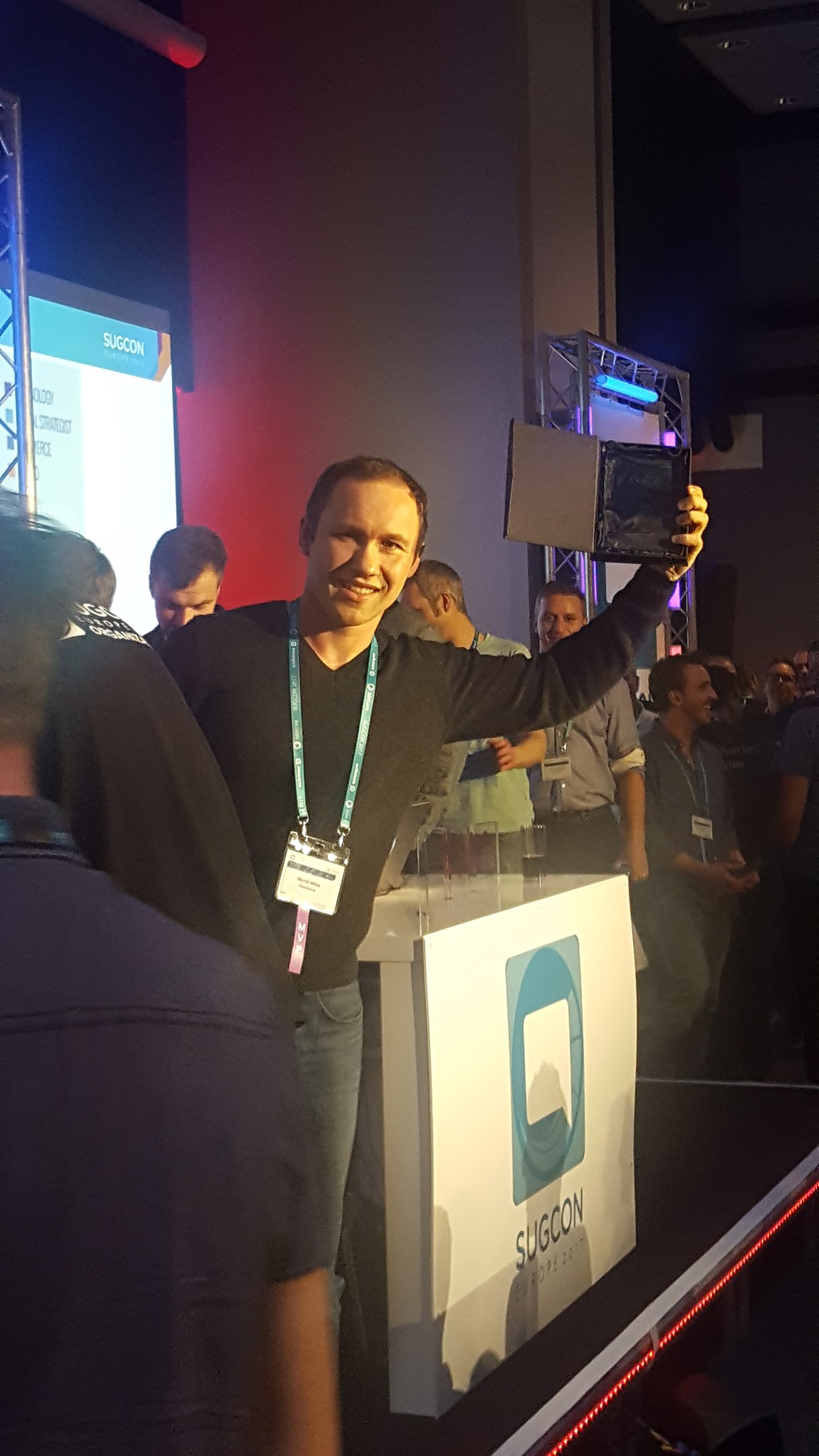
This time I was proud to announce the winners of the community award - The Most Productive Sitecore Authors of 2016. Three luxury looking trophies found their owners, well-deserved guys!
Anyway, I have got few thoughts/takeaways from that wonderful event.
Sitecore Helix has become a proven and reliable development approach for Sitecore already. The more complex your solution is - the more likely you'd use Helix. I am now working on a multinational and multi-project implementation for an insurance service provider and we are using Helix. Given that we have also a distributed development teams, it became crucial that we are doping the development under the same guidelines and each new team member, already familiar with Helix and SOLID principles, becomes productive quite quickly. Also deployment, quality assurance as well as the rest of day-to-day activities - are going to the same standards. My own opinion on Helix is that "if it is cooked well - it serves you well"
My greatest impression after attending SUGCon was after I saw how Mark Stiles combined Microsoft Cognitive Services with Sitecore. The future is already here!