Blog content
16 May 2026(0)
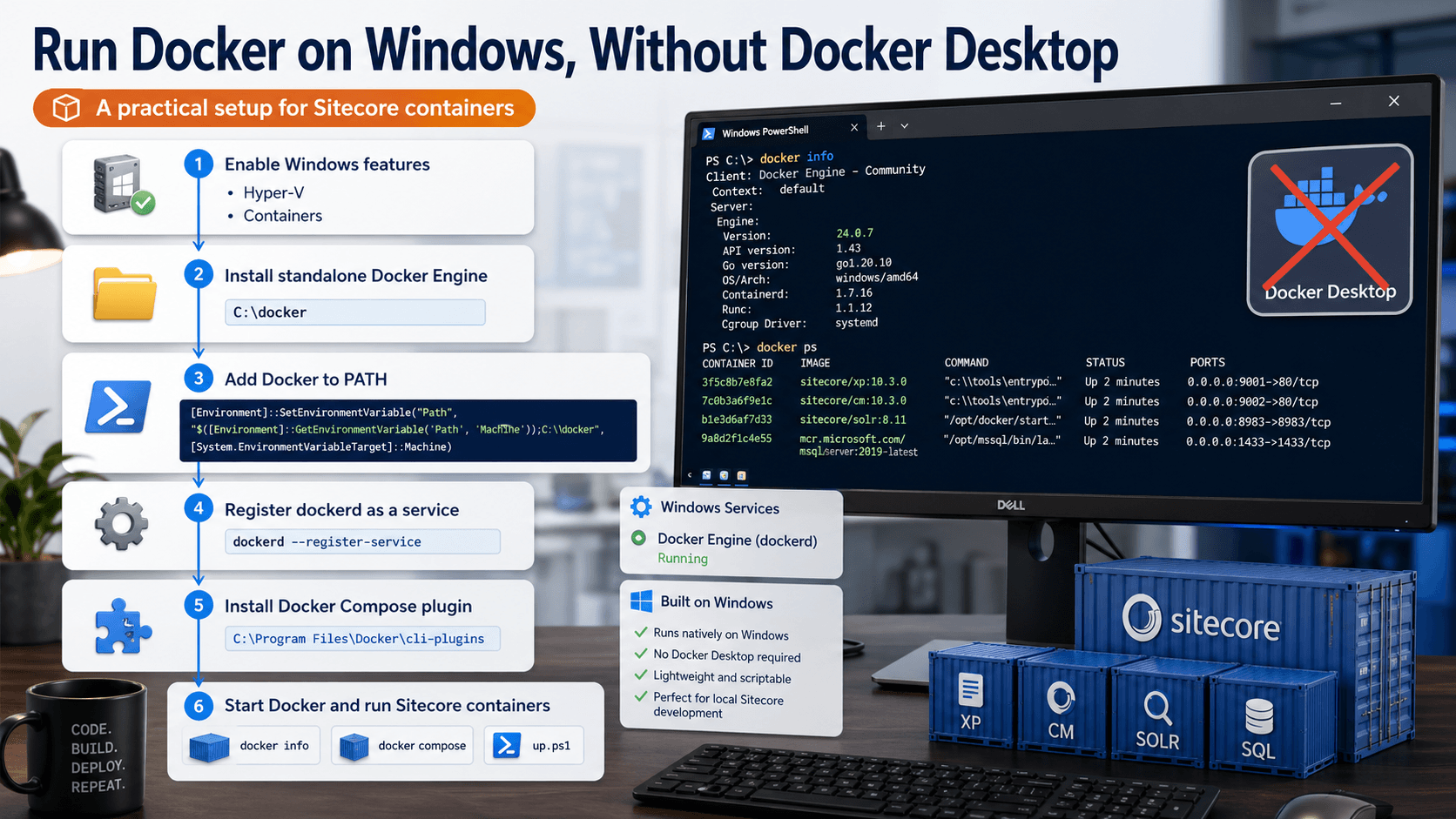
- Running SitecoreAL Containers Without Docker Desktop
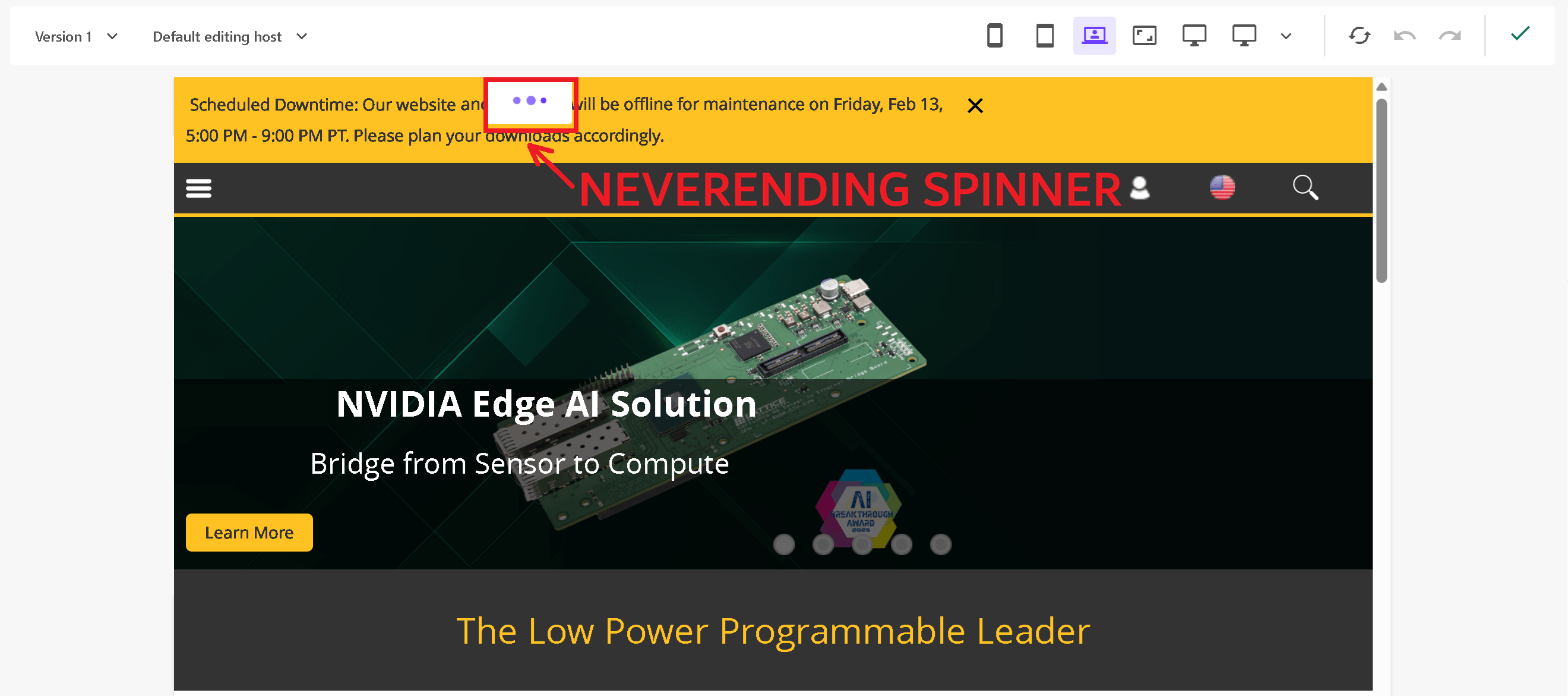
- Troubleshooting SitecoreAI Page Builder Stuck Forever on the Loading Spinner
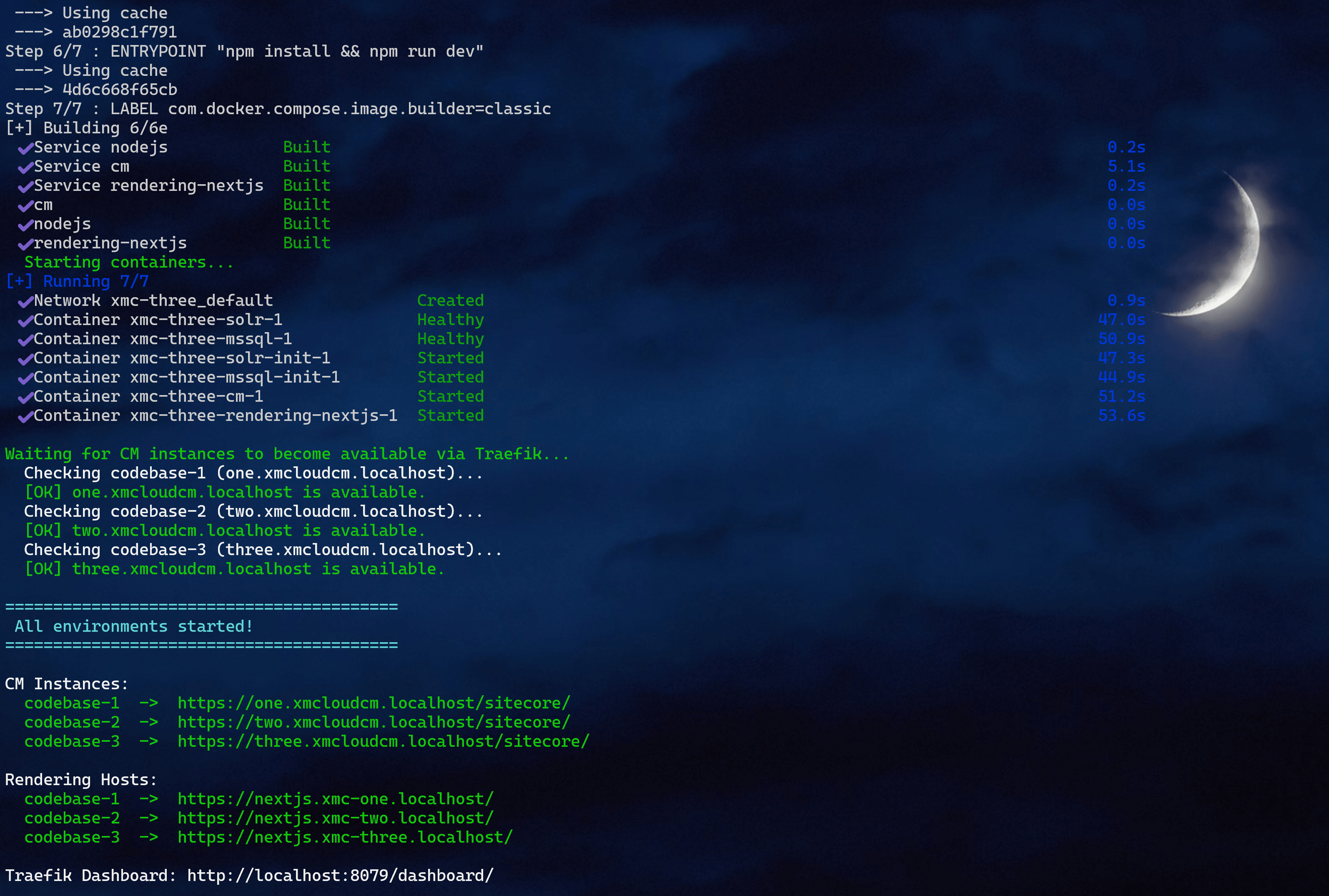
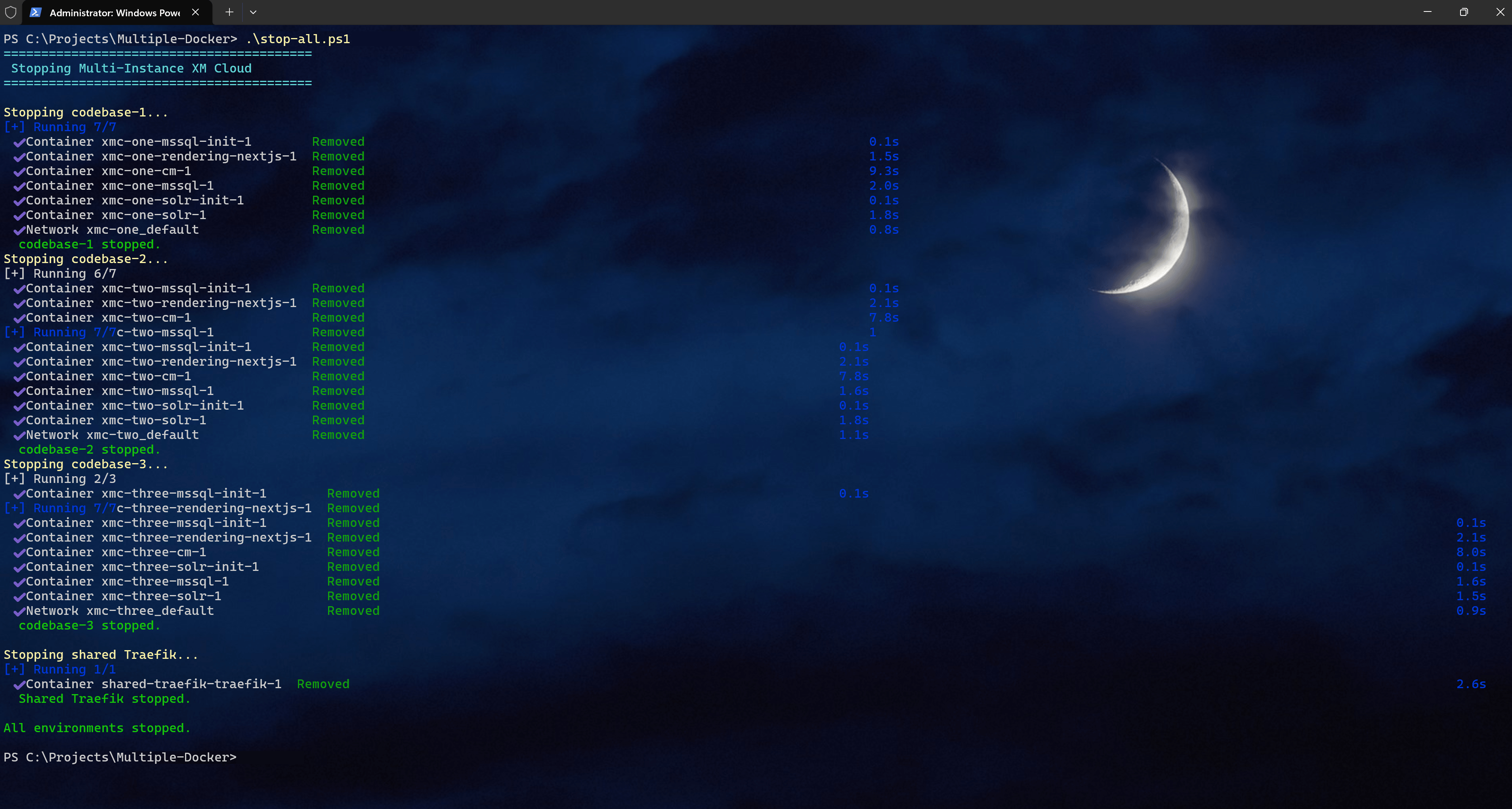
- How to run multiple SitecoreAI Docker instances simultaneously on a single host machine
- The Layout Container component - a missing puzzle piece hidden in plain sight
- Reviewing my 2025 Sitecore MVP contributions
- Sitecore PowerShell working from a SitecoreAI Marketplace app
- Case Study: Search Solutions Comparison for Sitecore XM Cloud Migration
- The Game Has Changed: Sitecore AI and the Dawn of the Agentic Era
- Sitecore Content SDK 1.2 brings App Router into XM Cloud
- The new and shiny Sitecore Marketplace
- Auto-migrating any Sitecore XP website to XM Cloud is actually possible!
- Top 10 Mistakes Organizations Make on Sitecore XM Cloud Implementations
- Resolving broken images issue on XM Cloud starterkit running in local containers
- Changing item ID in XM Cloud from item's context menu
- Dictionary in XM Cloud
- Using these XM Cloud hotkeys can significantly boost your productivity
- Using Sitecore Pipeline Profiler
- XM Cloud productivity tip: Use Cloud Portal Auto Login extension for Chrome
- SUGCON Europe 2025 Takeaways
- XM Cloud: Beyond the Serialization
- XM Cloud Headless Endpoints - Local vs Cloud vs Preview
- Sitecore XP vs XM Cloud full guide: which one to choose in 2025
- Compliance and Geographic Hosting Considerations for Sitecore XM/XP vs XM Cloud
- Redirects in Sitecore XM Cloud - know your options!
- SQL-level access to database in XM Cloud
- All you need to know about transforming Web.config on Sitecore XM Cloud
- Rendering Parameters vs. Rendering Variants - when should we use one or another
- Experience Edge: Know Your Limitations
- Sitemaps in Sitecore XM Cloud: Automation, Customization, and SEO Best Practices
- Reviewing my 2024 Sitecore MVP contributions
- XM Cloud content migration: connecting external database
- The correct way of creating own components with XM Cloud
- Keeping your own XM Cloud repository in sync with official XM Cloud starter kit template
- GitHub Action with XM Cloud
- .NET Core Renderings for XM Cloud finally gets some love
- XM Cloud: a modern way to content management and import with Authoring GraphQL API
- Full guide to enabling Headless Multisite Add-On for your XM Cloud solution
- XM Cloud Forms Builder released
- Using conditions with XM Cloud Form Builder
- A full guide to creating a multi-language sites with Sitecore XM Cloud and Next.js
- Sitecore 10.4 is out and here’s all you need to know about it
- Cypress: a new generation of end-to-end testing
- Storybook
- Going Beyond the Sitecore Mentor Program: Pushing Boundaries with Exclusive Mentorship
- A crash course of Next.js: rendering strategies and data fetching (part 1)
- A crash course of Next.js: UI-related and environmental (part 2)
- A crash course of Next.js: Routing and Middleware (part 3)
- A crash course of Next.js: Caching, Authentication and Going Live tasks (part 4)
- A crash course of Next.js: TypeScript (part 5)
- A crash course of GraphQL – from Zero to Hero
- GraphQL: not an ideal one!
- Tunneling out Sitecore 10.3 from a local machine containers for the full global access
- Building Traefik Images with ltsc2022 for your Sitecore Deployments
- LTSC2022 images for Sitecore containers released: what does it mean to me?
- Content Hub One full review: good, bad and ugly
- The ultimate guide to Sitecore XM Cloud
- Sifon - the easiest way of installing Sitecore XM/XP to your local machine
- Sitecore Edge considerations for sitemap
- Sitecore 10.3 is out! What's new?
- My learnings from project management and lead experience mistakes I came across
- My speech proposal for SUGCON ANZ: Developers' guide to XM Cloud
- Infrastructure-as-Code: best practices you have to comply with
- Sitecore Edge and XM Cloud - explain it to me as I was 5
- OrderCloud Certification - tips on preparation for the successful pass
- My SUGCON 2022 Presentation: The Mastery of Sitecore Upgrades
- Content Hub Administrator and Developer Certification - tips on preparation and successful pass
- Sifon 1.2.6 released with Sitecore 10.2 and Windows 11 support
- Applying vulnerability fix to containerized environments
- Troubleshooting Marketing Automation service start for XP 10.2 installation on Windows 11
- 10+2 features of Sitecore 10.2 you must be aware of
- Sitecore 10 .NET Fundamental Developer Certification Exam is now available
- Things beginners get incorrect about Kubernetes
- Sym Proposal: сonverting Sitecore back-end developer skills for JSS & Next.js
- Evolutional approach to Next.js and its modes
- Sitecore gets presented at Awesome List
- A PROPER way of validating models passed into a view
- Advanced editing: managing dynamic popups from custom RTE dialog
- A nice way of using HTML Helper for accessing Rendering Parameters along with Glass Mapper
- Sum-up of my PowerShell experience. Best practices
- XBlog on Sitecore 10.1? That's possible!
- Upgrading Sitecore like a Pro
- HTTPS, SSL and TLS FAQs
- Everything you wanted to ask about "Items-as-Resources" coming with new Sitecore 10.1
- A useful admin-folder page that helps testing Active Directory claims mapping
- Sharing Sitecore Identity Server between two independent instances of Sitecore
- What is a Reverse Proxy and what do you need one for?
- The easiest way of installing Solr cores for SXA search
- All you need to know about Sitecore 10
- Cannot use a Hyper-V disk VHDX image you've been shared with? That's how to manage it properly
- Why CNAB could be a game-changer for Docker containers and how Sitecore can benefit from that?
- Sitecore RSS Feed revised by using Content Search API instead of unproductive Sitecore Query
- Walkthrough: Using Publishing Targets in order to create a preview environment with Sitecore 9.3
- Sitecore Docker breaks when running Build.ps1 with "hcsshim::PrepareLayer failed in Win32" message
- Tip of the day: running Sitecore Docker from within Hyper-V virtual machine is in fact possible
- Welcome Sifon - a must-have tool for any Sitecore developer,to simplify most of you day-to-day DevOps
- Uploading scheduled auto-backups of editors content for Helix / SXA website into Azure Blob storage
- Implementing blogs index page with filters and paging: SXA walkthrough
- Boosting productivity with Sitecore by employing user scripts on an example of SXA activities
- Staying productive on Sitecore development
- Running IIS on local Windows Nano Server in Hyper-V rather than in docker
- Starting with Docker and Sitecore
- SUGCON 2019 Takeaways
- Script Reference Tag coming to improve your SEO
- Adding Show Config icon to Sitecore Launchpad
- Productivity improvement: implementing Expand all and Collapse all buttons to Content Editor
- Implementing Sitecore security domain role multi-selector field
- Image tag wrapped with anchor both having own classes but without any unwanted component wrappings, easy? Not OOB in SXA, but here's the fix!
- Walktrough: creating a footer for SXA website implementing a precisely demanded front end markup
- How to add id and data-attributes to a Rendering Variant in SXA?
- Script rendering variant field in SXA and why would one need it
- Welcome Item Reference - a rendering variant field missing out of the box in SXA
- SXA: Implementing URL query parameter rendering variant with little efforts
- Troubleshooting SXA "Failed to render rendering. Message: An unhandled exception occurred. Source: Sitecore.Mvc"
- What is Query Variant Field to be used with rendering variants and few real-life scenarios of using it
- How to make a link to downloadable media item from within SXA rendering variant?
- Creating custom SXA component with rendering variants and (almost) no codebehind on an example of social share buttons
- SXA tip: use information scaffolding fields to get visibility over your components in Experience Editor
- Creating a custom rendering variant section to render an element with a background image
- I have been awarded the Sitecore Most Valuable Professional Technology Award in 2019 - Sitecore MVP
- Rule missing OOB in Sitecore, where the Experience Editor is in editing mode
- Quick tip: using rules engine for SXA rendering variants
- SXA built-in token tools to be used with rendering variant templates
- Which certificates (and where to) got installed with Sitecore 9.1?
- Configuring search indexes for SXA 1.8
- SXA tokens for datasource queries - a cheatsheet
- Troubleshooting Solr populate schema for Sitecore Commerce 9.0 update 3 installation
- Mythical SXA body-top placeholder shown in Experience Editor
- Fixing issues preventing one having solution with SXA 1.8 along with Sitecore XP 9.0 update 2
- SIF certificate error: Cannot process argument transformation on parameter 'Signer'. Cannot convert the "System.Object[]" value of type "System.Object[]" to type "System.Security.Cryptography.X509Certificates.X509Certificate2"
- Extracting package installation functionality out of Sitecore Commerce 9 SIF
- Troubleshooting Sitecore Commerce 9 installation
- Amazing Sitecore PowerShell Extension Remoting - a quick start to make it work
- Sitecore PowerShell Extension snippets collection
- WebApi and ServicesClient minimal project modules skeletons
- How to use Install-SitecoreConfiguration from SIF with your custom configuration on an example of installing SPE and SXA along with Sitecore
- One of the first Sitecore 9 solutions ever reached the production
- Field level deny permissions in Helix based on Habitat and how that affects your workflows?
- Some useful batch and PowerShell snippets helping Sitecore automation
- Configuring role and localenv variables in Sitecore 9 - PowerShell way
- Separating content items from definition using Unicorn's NewItemsEvaluator
- Creating XML Sitemap for the Helix solution
- Handling 404 in Helix
- Fixing: Sitecore 9 installer unable to connect to Solr server, while it is available
- Adding Unicorn icon to Sitecore Launchpad
- Creating a simple workflow in Helix
- How Apply-Xml-Transform works in Helix / Habitat
- Get rid of IIS Express processes when debugging Helix solutions
- Introducing Sitecore Discussion Club
- Updating Sitecore 9 with Helix to 9.0 update 1 (rev. 171219)
- Searchable list of Sitecore modules as well as their authors
- Routine for renaming a Helix module
- How to make Glass Mapper working with Sitecore 9 and Helix
- Sitecore gives 60 days of trial for developers
- 10 Useful tricks for Helix development
- Helix working on Sitecore 9
- Introducing Sitecore Telegram
- Sitecore Cheat Sheets
- Symposium 2017 and takeaways
- Few SQL tricks helping to work with Sitecore
- Sitecore 9 is out there
- Updating existing presentation details of base template's standard values after it has been set on derived templates
- SUGCon 2017 insights and takeaways
- Helix + Glass Mapper + T4 Templates = Code Generation
- Helix: An approach for restoring WebRoot to an initial state of vanilla Sitecore installation
- Creating "Change item ID" module. Part 1 - Identifying the requirements
- Creating "Change item ID" module. Part 2 - The implementation
- Migrating existing code to Helix. Fixing invalid dynamic placeholders
- Know your tools: The easiest way to install Habitat - Habitat Solution Installer
- Know your tools: The easiest way to add a new project into your Helix solution
- Sussex Sitecore User Group welcomes you - 22nd March 2017
- How to make Content Editor search by plain GUIDs without braces and dashes? (part 1)
- How to make Content Editor search by plain GUIDs without braces and dashes? (part 2)
- Got a handy new tool for "finding ends" of presentation items - Rendering Chrome for Components
- Becoming a Sitecore MVP!
- Why am I getting "Item is not a template" error on data items in Content Editor?
- Sitecore Link project - summing up the year 2016 and greatest plans for 2017
- Media Aliases in Sitecore 8.2 Update 1
- Helix project, MVC routing and the form posting back to controller. Part 1 - Prerequisites
- Helix project, MVC routing and the form posting back to controller. Part 2 - Creating a form
- Helix project, MVC routing and the form posting back to controller. Part 3 - Adding validation
- November Sitecore London User Group
- Back to blogging after a while
- Learning Sitecore Habitat
- Sitecore Technical User Group UK - January 2016 - Download presentations
- I join "The Monads" team at the Sitecore Hackathon 2016! What about you?
- Onero is now updated to version 1.2
- How to use Onero with Sitecore
- Using Onero with non-Sitecore websites - testing Transport for London website
- Sitecore have released 8.1 update 1 and strongly urges customer to upgrade
- Welcome Onero Page Runner - now with Sitecore support!
- StackOverflow: Sitecore Development on Mac
- All Sitecore References - at one place!
- Sitecore XP 8 Upgrade for .NET Developers training - How was that?
- StackOverflow: Sitecore 8.1 bug - Launchpad brings HTTP 500 errors and several icons including FXM are missing
- Sitecore 8.1: what does new CMS-only mode mean?
- Sitecore Improvements project
- Sitecore 8.1 has been released!
- StackOverflow: How to use Redirect Module in Sitecore
- Sitecore Personalisation based on URL query string parameters
- StackOverflow 2 questions on Multi-Site configuration: Multisite Best Practice for setting up Visual Studio Project and Manage web.config in multisite solution
- Productivity improvement: Device Editor showing datasource and previewing that right from a pop-up click
- Productivity Improvement: Layout Details - click an icon to look-up or modify layouts / sublayouts / renderings
- Creating a Presentation Exists Gutter - get even faster access to item's Presentation Details
- StackOverflow: Can a multilingual Sitecore 6 web page have an alias for each language?
- Item not published. Why? Let's troubleshoot that!
- StackOverflow: Need clarity on Sitecore template values, standard values, and branch templates
- Version Layouts - what is that for?
- StackOverflow: Sitecore FXM issue - parent selector is missing in Add to Placeholder dialog
- StackOverflow: Including MVC in existing Sitecore Project
- Sitecore Item Extension Methods
- Sitecore 8: Federated Experience Manager - what is all about?
- StackOverflow: Adding route in Application_Start
- Basics: working with generic content in Sitecore
- Sitecore 8.0 Update 5 is released
- Unicorn - the simplest way to share Sitecore items in the source control along with your code
- Sitecore with SEO: overview and compare ways for managing duplicate content
- Mass update of field value for all existing items of certain template - two ways of achieving result
- PowerShell Module issue - NullReferenceException when trying to open PowerShell ISE
- StackOverflow: How to edit template content properties via Sitecore Rocks?
- Best way to master Rocks - start using it guided by Sitecore Rocks Cheat Sheet
- Sitecore 8: re-indexing errors out and module installation never ends without MongoDB running
- Understanding Buckets: adding new items to buckets correctly
- How to host several sites within the same Sitecore instance without specifying a hostname, just on different ports
- Tip: copying Presentation Details manually
- Web Forms for Marketers 8.0 - missing Save to Database action and making it work with SQL database again
- Sitecore extensions for Google Chrome review
- Fixing unfriendly default Sitecore 8 styles from huge elements, padding, spacings, and few more improvements (package)
- The quickest access to Layout Details dialog of Presentation Details
- SwitchMasterToWeb.config for Sitecore 8
- How to check your license in Sitecore
- StackOverflow: Is it possible to change a Page to branch?
- Sitecore xDB Cloud: don't want to mess with xDB? Let Sitecore do that for you!
- Software every good Sitecore developer should be aware of
- Sitecore Boilerplate - the repository of best practices all at the same place
- How websites are resolved with Sitecore - the essentials
- Editing content on a CD server. Part 1. MVC ajax request to controller
- Editing content on a CD server. Part 2. Using Event Queue to sync CD data with CM
- Wildcard items ("*"-pages) with MVC, passing the correct datasources based on requested item URL
- Sitecore Desktop usability improvements
- Know your tools: SIM - Sitecore Instance Manager
- IIS URL Rewrite module - few SEO tricks
- IIS and URL Rewrite module working as Reverse Proxy
- Debugging and inspecting Sitecore libraries
- Sitecore tips
- Sitecore.Kernel and Sitecore.MVC delivered via a NuGet library
- Attach to IIS - debugging Sitecore with just one hotkey!
- API - Useful IDisposable context switchers
- [Updatable] API snippets - the basics
- Case study: Collection database for Metropolitan Museum of Art (NYC)
So, don't miss out! Subscribe to this blog/twitter from the buttons above!